Showing posts with label Best Buy Coupons Entire Purchase. Show all posts

Thursday, July 21, 2016

5 TIPS FOR CHOOSING THE BEST HEADPHONES FOR RUNNING

You need Best Buy Coupons 20% OFF Entire Purchase:  Enter this Best Buy 20% OFF Coupon Code  during checkout to get 20% 50%  Promo Code Off  for activity trackers & pedometers. Check Best Buy 20% OFF Promo Code now!
The perfect soundtrack makes an okay run into a great one, but not without the right equipment. Our fan in the UK, Will Tottle, shares some of his expertise in a guest post about choosing the right headphones.
Choosing headphones for working out and running can be pretty tricky and require a lot of thought, especially considering the number of factors that could affect your headphones and overall experience. Things like the sounds quality, price, and durability are things that can make the decision process that much harder.
However, it doesn’t have to be this way. All you need to do is think about the kind of headphones you want: the style, the fit, everything that would make them perfect for you. Don’t be afraid to test some out.  Your perfect pair of headphones are waiting, and here are a few tips to help you through the decision process.

#1 Buds or phones?

The first question you need to ask yourself is whether you want earbud or headphones for working out and running. Some people find headphones a bit sweaty and slipper, while others find that extended use of earbuds can cause discomfort and an increased risk of spots as a result of the collection of sweat. Try on a few pairs of each type to figure out what you like best.

#2 Bluetooth

You need to ask yourself if you want Bluetooth or not. It really is paving the way for the future with its wireless headphones and ear buds. The best part is that they sit really comfortably and you don’t need to worry about the wires hitting your chest as you run.
Not only this, but there are no longer any reasons for you to stop and fiddle with your phone as they come with remotes on the side so that you can control music/volume and even answer calls.

#3 Resistance

Waterproof, water resistant, and sweat proof headphones can be a really integral part of the headphone selection process. If you are triathlon training or bound to be running in pouring rain, then you will need a pair of these.
Sweat proof ones are less likely to fall out of your ears/off your head while you run and are protected from any damage that could be caused by your sweat. They are a safe and sensible purchase to make.

#4 Sound Quality

The headphones you choose should have a clear sound, and if you feel like spending a little extra, come with a smooth bass. Good sound is vital to a good run, the music is what helps to motivate you and keep you running to a steady beat. Clear sound means an effective and worthwhile workout.

#5 Durability

A final word of advice is to buy a pair of headphones that you know will last. It’s all well and good to buy a cheap and easily breakable pair, but you end up spending more in the long run. A good pair of headphones will cost a little extra, but you know they will last you years as opposed to six months.
A pair of headphones that are durable and sturdy should be able to survive life in a gym bag and being thrown around a little without an effect on their overall performance.

Wednesday, July 6, 2016

How to Increase Your Windows Laptop’s Battery Life

5 Reasons to Buy a Car GPS in the Age of Smartphones

You need Best Buy Coupons 20% OFF Entire Purchase:  Enter this Best Buy 20% OFF Coupon Code  during checkout to get 20% 50%  Promo Code Off  for activity trackers & pedometers. Check Best Buy 20% OFF Promo Code now!
We often fixate on smartphone battery life, but most laptops still don’t have all-day battery life. Rather than always using your laptop tethered to an outlet, here are some ways to squeeze more life from your laptop’s battery.
None of these tricks will turn a laptop without much stamina into an all-day workhorse, but they’ll help you go without an outlet for a while longer. Pay particular attention to your laptop’s display — that’s the big battery sucker.

Reduce Screen Brightness

The biggest battery drain on any modern portable electronic device — whether it’s a laptop, smartphone, or tablet — is the display. Reducing your screen’s brightness is a simple way to squeeze significantly more time from your laptop’s battery.
On a typical laptop, you generally hold the Function (Fn) key and press the brightness buttons on your laptop keyboard. The lower the brightness level, the longer you can use your laptop on battery power.
brightness-key
You can also use the Windows Mobility Center to quickly adjust screen brightness. Open it by pressing Windows Key + X on Windows 7. On Windows 8, you can launch it from the Control Panel — Windows Key + X opens the power user menu instead.

Have Your Display Automatically Turn Off

If you step away from your laptop for a few minutes, its screen will still be on, draining power. You can set more aggressive display power settings to have the laptop dim and turn off the display when you’re not using it.
Open the Power Options dialog in the Control Panel and set your display to dim and turn off after a short period of time. You can move your mouse or press any key to turn the display right back on with no delay, so this is an easy way to save power — as long as the display doesn’t turn off while you’re using the laptop, this shouldn’t bother you too much. Media players set the display to automatically stay on while they’re running, ensuring you can still watch a video without constantly having to move your mouse or change your power settings.
turn-off-display-after-minutes-in-windows

Disable Bluetooth and Other Hardware Devices

Your laptop likely has a Bluetooth radio and may even have an infrared (IR) port. All of these devices use battery power simply by being enabled and powered on. You can save battery power by disabling them when you aren’t using them. To disable Bluetooth, you can often press the Function (Fn) key and press the key with the Bluetooth symbol on your laptop.
Disabling Wi-Fi can also help if you aren’t using it. For example, if you’re using your laptop on an airplane and not taking advantage of in-flight Wi-Fi, turn off your laptop’s Wi-Fi to save some power. Wi-Fi can be turned off in a similar way using the function keys on your laptop or even by disabling the Wi-Fi adapter in the Control Panel’s network connections window.
wifi-function-key

Tweak Your Power Plan

Windows offers power plans that can quickly change your laptop’s power settings to different profiles. For example, you can have your computer in Balanced mode most of the time and switch to Power saver mode when you need every bit of power you can get. Each power plan’s settings can be modified individually. You’ll find power plans in the Control Panel’s Power Options window.
control-panel-power-options
To modify advanced power options, click the Change plan settings link and select Change advanced power settings.
You can change a variety of settings here, including setting your laptop to power off its hard drive more quickly and telling your computer to slow down the processor rather than turning on the fan if it becomes hot. Both of these behaviors will save power. The default settings should be fairly optimal if you select Power saver mode, but you can make the settings even more aggressive in some areas.
power-plan-settings

Use the Windows Power Troubleshooter

Windows 7 and 8 include a power troubleshooting tool that will scan your system for common battery drains and automatically fix them. To load this tool, open the Troubleshooting pane in the Control Panel — perform a search for Troubleshooting to find it.
access-troubleshooters-in-windows
Select the View All option in the Troubleshooting pane and launch the Power troubleshooter.
windows-7-power-troubleshooter
Windows will look for common issues and automatically fix them. This is a quick way to check if a laptop’s settings are optimal without digging through many different options dialogs.
windows-power-troubleshooter
If you’ve had your laptop for a while and the battery is holding less power than it used to — but you’re not ready to upgrade to a new laptop just yet — you can try replacing your laptop’s battery with a new one for even longer battery life.

Tuesday, May 3, 2016

How to Clean a Refrigerator

Best Buy Coupons 20% OFF Entire Purchase:  Enter this Best Buy 10% OFF Coupon Code  during checkout to get 20% 50%  Promo Code Off Clearance Mobile Phone Cases. Check Best Buy 10% OFF Promo Code now!
Your refrigerator is one the most extensively used appliance in your house that does not even get a rest.
Furthermore, it is often tortured with various spills, odors, and piles of leftovers and useless moldy food bagged securely waiting to be thrown away.
Thus, it is essential to clean your refrigerator on a regular basis. However, it is not as quick and easy as cleaning your microwave.
Before proceeding to clean your refrigerator, though, make sure you check the manufacturer’s instructions carefully.

How to Clean Your Refrigerator

Steps for cleaning

  1. Unplug the refrigerator or turn the inside temperature control off (saves electricity).
    Step1
  2. Now, empty the refrigerator. For the time being, you can place the fragile foods such as dairy products and meats in a cooler with ice so that they do not get spoiled.
    Step2
  3. Remove all the removable shelves, drawers, and compartments.
    Step3
  4. Put all the metal and plastic parts in the sink and rinse them with a mixture of warm water and dish soap.
    Step4
    As for the ones made of glass or ceramic, do not immerse them in warm water right away otherwise they may crack or break. Let them remain at room temperature for a while.
  5. Clean the inside of the refrigerator and the interior door with a damp cloth/sponge/towel and a mild detergent. Detergents, however, can leave behind a smell that your food is likely to absorb. Thus, prefer to use a solution of equal parts of white vinegar and warm water or a mixture of two tablespoons of baking soda and a quart of warm water.
    Step5
    For removing stubborn stains, consider using white toothpaste. Use a plastic non-abrasive scrubber to scrub the stains. Besides, you can place a warm wash cloth on stubborn stains and spills for a few minutes and then remove it to make it easier to wipe them off.
  6. To remove grime from shelf seams and rubber seals, you may use an old toothbrush soaked in the cleaning solution.
    Step6
    For cleaning gaskets on the fridge and freezer doors, you can use an all-purpose cleaner or simply white vinegar (it prevents mildew).
  7. Locate the drip pan of the refrigerator. Pull it out carefully and clean it with warm soapy water or the half vinegar and half water solution. Let it dry completely before re-installing.
    Step7
  8. For cleaning the exterior of a stainless steel refrigerator, you can soak white vinegar in a microfiber cloth and rub it on the surface in the direction of the grain. To enhance the shine, you may put a few drops of olive oil on a clean piece of cloth and rub it on the exterior.
    Step8
    Alternatively, you can simply use a commercial stainless steel spray. In case you have an enameled steel refrigerator, you may want to use a multipurpose cleaner. Wipe the areas around the handles, too.
  9. Make sure you wipe dry the outside of the refrigerator after cleaning to prevent streaks.
    step9
  10. Finally, plug in the refrigerator and put the shelves, drawers, etc. back in when they dry thoroughly. You can now store the food in your fridge.
    Step10
The process of cleaning may take about 20-30 minutes or more, depending on the amount of cleaning your refrigerator is craving for! When dealing with a moldy fridge due to its not being in use for days or weeks, you may use a bleach formula prepared by mixing one part each of bleach and water.
Along with cleaning, it is essential to inspect all the foods and beverages stored in your refrigerator to discard the ones that are spoiled or have exceeded their expiry dates.

Saturday, December 19, 2015

Best Buy: Up to 70% OFF with Deal of the Day

Monday, November 30, 2015

Best Buy Coupons 20% Off Entire Purchase 2015

Saturday, November 28, 2015

Best Buy Coupons for Entire Purchase: Top gifts for him

Enter this Best Buy Promo Code 2015 for entire purchase during checkout to get more Black Friday Deals. Get Best Buy Coupon Code 2015 and Shop now amazing gifts for him now! Limited time only!

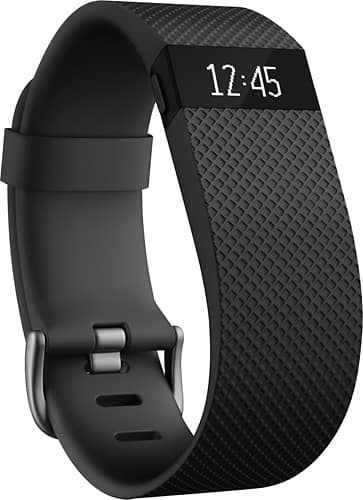
  • Model: FB405BKL
  • SKU: 8681515
  • Fits wrists from 6.2" to 7.6"
  • Tracks steps taken, distance traveled, calories burned, stairs climbed, elapsed time and sleep metrics
  • Wrist-based heart rate monitoring
  • Call notifications
  • Backlit display


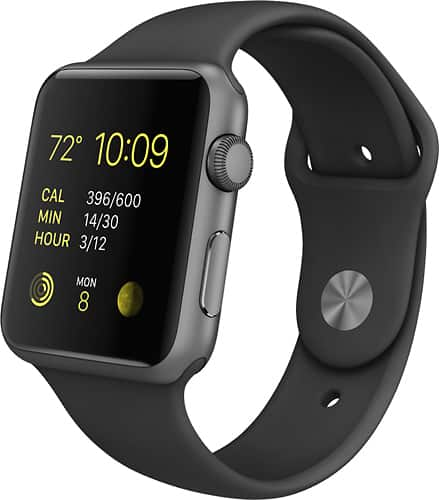
    • Model: MJ3T2LL/A
    • SKU: 4274802
    Compatible with iPhone 5, 5c, 5s, 6 and 6 Plus with iOS 8.2 or later; Wi-Fi; Bluetooth 4.0; Digital Crown; Taptic Engine; Force Touch; Retina display

    Monday, November 23, 2015

    Best Buy Black Friday 2015: Enter Best Buy Promo Code 2015 to save more

    Enter this Best Buy Promo Code 2015 during checkout to get more Black Friday Deals. Get Best Buy Coupon Code 2015 and Shop now! Limited time only!


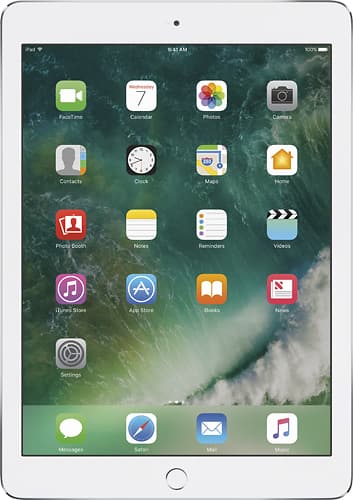
    • Model: MGLW2LL/A
    • SKU: 2881022
    • 9.7" Retina display
    • Apple iOS 8.1
    • 16GB storage capacity
    • A8X chip
    • Wi-Fi
    • 8MP iSight camera
    Included Free: Titanium Internet Security - 3-Device - 6 Months Subscription - Android/iOS - Mac/Windows [Download]

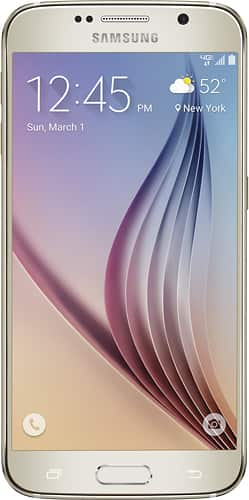
    • Model: SPHG92032BKS
    • SKU: 4372036
    • Android 5.0 Lollipop operating system
    • 4G LTE speed
    • Wi-Fi
    • 5.1" Super AMOLED touch screen
    • Bluetooth enabled

    Emotions run wild in the mind of a little girl who is uprooted from her peaceful life in the Midwest and forced to move to San Francisco in this Pixar adventure from director Pete Docter

    Saturday, November 21, 2015

    GIFTS FOR FAMILY VACATION

    >>> Use Best Buy promo code 2015 for 20% OFF on 1 Regular-Priced toys, games and drones! FREE Shipping inlcuded for orders of $25 or more! Best Buy Promo Code 2015 at here now!


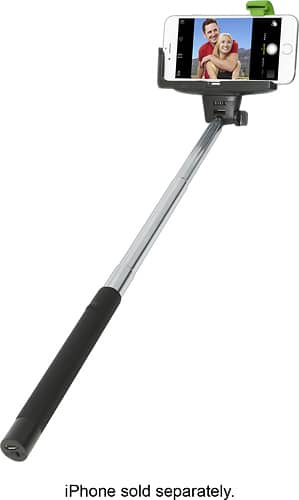
    Give your kids portable devices and say good-bye to hearing "Are we there yet?" on your next vacation. As you explore new scenery, make time for family photos that last a lifetime.

    ReTrak - Bluetooth Selfie Stick - Black


    For use with Apple® iPhone® 4, 5, 5s and 6 and Samsung Galaxy S III and S 4 cell phones; 38.4" maximum extension; 12" minimum extension; Bluetooth; rotates 180°; up to 100 hours of battery life

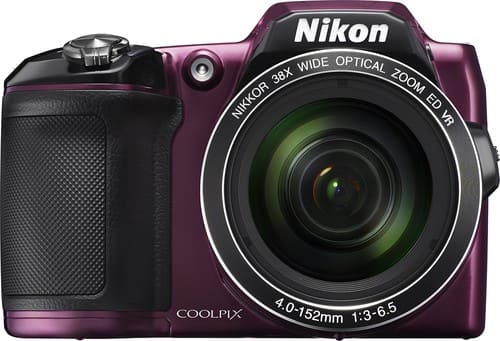
    Nikon - Coolpix L840 16.0-Megapixel Digital Camera - Plum


    • Model: 26487
    • SKU: 3839052
    Only at Best Buy
    • 38x optical/4x digital zoom
    • 3" TFT-LCD display
    • 1080p video resolution
    • Optical image stabilization
    • Wi-Fi and NFC enabled

    Friday, November 20, 2015

    MORE BEST BUY PROMO CODES DECEMBER 2015

    >>> Use Best Buy promo code 2015 for 20% OFF on 1 Regular-Priced toys, games and drones! FREE Shipping inlcuded for orders of $25 or more! Best Buy Promo Code 2015 at here now!

    Up To $100 OFF on Select 2-in-1 Laptops
    Go through this link and save Up To $100 OFF on Select 2-in-1 Laptops at Best Buy!

    15% OFF Select iRobot Vacuums and Floor Care, Plus Free Shipping
    Best Buy is offering 15% OFF Select iRobot Vacuums and Floor Care, Plus Free Shipping! Buy now!

    Up To $300 OFF on Samsung Robotic Vacuums + FREE Shipping
    Best Buy now offers Up To $300 OFF on Samsung Robotic Vacuums + FREE Shipping! No code needed!

    Best Buy Coupons 20% OFF Select Small Appliances + Free Shipping
    Best Buy Coupons: save 20% OFF Select Small Appliances + Free Shipping at Best Buy! Limited time offer!

    Best Buy Coupons 20% OFF Entire Purchase Of KitchenAid Appliances, Tools and More
    Best Buy Coupons: save 20% OFF Entire Purchase Of KitchenAid Appliances, Tools and More! Ends Nov 21.2015!

    Wednesday, November 18, 2015

    Best Buy Coupons 20% OFF Entire Purchase For over 300 Black Friday Deals

    Best Buy Coupons 20% OFF Entire Purchase: Just reveal over 300 more Black Friday Deals. Get Best Buy Coupon, Promo Code 2015 and Enjoy shopping at Best Buy!

    Samsung 4K Ultra HD TV: With an expansive 2160p screen and 4K Ultra HD resolution, this TV brings your shows and movies to life. Smart options such as ConnectShare movie and screen mirroring offer endless streaming and connection capabilities.

    Toshiba 49L310U LED HDTV: This TV lets you view movies, TV shows, video games and more at Full HD resolution. Plus, a USB port lets you view compatible image and video files by plugging in a USB storage device.

    Thursday, November 5, 2015

    Best Buy Coupons Entire Purchase: How to Choose Kitchen Appliances

    >>> Go through Best Buy Coupons 20% OFF Entire Purchase and save up to 60% at the Best Buy Small kitchen appliances and More! While supplies last! Go through Best Buy Coupons 2015 and save up 20% - 60% OFF on Entire Purchase!

    Appliances are the workhorses of your kitchen. Together, they will add up to about nine percent of your kitchen budget. This figure is surprisingly low, considering the technological advances and energy efficiencies today's appliances offer. While features and performance are obviously the most important considerations in choosing appliances, how they'll look in your kitchen probably matters to you, too.


    White appliances are still the classic favorite, followed by black. Stainless steel, with its professional look, continues to grow in popularity. If you covet a simple Shaker-style space or a luxurious Italian villa setting, however, you may want to hide the fridge and dishwasher out of sight. To meet this need, savvy cabinet manufacturers offer coordinated cabinet fronts that adhere easily and provide a custom-designed look. To further the traditional, low-tech look, you can opt for small-appliance depots in countertop-height cabinets.

    You can even choose a specially designed under-counter oven. In this article, we will examine most kitchen appliances, including:

    How to Choose an Oven: Ovens and ranges come in a wide variety of shapes and sizes, and it's not always easy to figure which model would be right fit for your kitchen. In this section, we will review all the oven and range options available on the market, including gas versus electric. We will also look at range hoods, a vital element of any kitchen where you plan to do a lot of cooking.

    How to Choose a Refrigerator: Buying the right refrigerator is vitally important. Not only is refrigerator responsible for preventing your food from spoiling, it is also one of the few appliances in your home that runs continuously all the time. On this page, we will show you how to find a reliable refrigerator and how to find the perfect refrigerator for your kitchen.

    How to Choose a Sink: When buying a sink for your kitchen there are many factors to consider. Sinks do far more than just provide cold and hot water. You must also consider water purifiers, garbage disposals, and what material you want your sink made out of. On this page, we will answer all of your sink-buying questions and related sink materials.

    How to Choose a Dishwasher: Dishwashers can range from elegant high-end models to small, counter-top units. Choosing the right dishwasher will depend on the features you want and the look of your kitchen. In this section, we will help you pick the perfect dishwasher for you dream kitchen.