Showing posts with label Best Buy Promo Code October 2015. Show all posts

Thursday, July 21, 2016

5 TIPS FOR CHOOSING THE BEST HEADPHONES FOR RUNNING

You need Best Buy Coupons 20% OFF Entire Purchase:  Enter this Best Buy 20% OFF Coupon Code  during checkout to get 20% 50%  Promo Code Off  for activity trackers & pedometers. Check Best Buy 20% OFF Promo Code now!
The perfect soundtrack makes an okay run into a great one, but not without the right equipment. Our fan in the UK, Will Tottle, shares some of his expertise in a guest post about choosing the right headphones.
Choosing headphones for working out and running can be pretty tricky and require a lot of thought, especially considering the number of factors that could affect your headphones and overall experience. Things like the sounds quality, price, and durability are things that can make the decision process that much harder.
However, it doesn’t have to be this way. All you need to do is think about the kind of headphones you want: the style, the fit, everything that would make them perfect for you. Don’t be afraid to test some out.  Your perfect pair of headphones are waiting, and here are a few tips to help you through the decision process.

#1 Buds or phones?

The first question you need to ask yourself is whether you want earbud or headphones for working out and running. Some people find headphones a bit sweaty and slipper, while others find that extended use of earbuds can cause discomfort and an increased risk of spots as a result of the collection of sweat. Try on a few pairs of each type to figure out what you like best.

#2 Bluetooth

You need to ask yourself if you want Bluetooth or not. It really is paving the way for the future with its wireless headphones and ear buds. The best part is that they sit really comfortably and you don’t need to worry about the wires hitting your chest as you run.
Not only this, but there are no longer any reasons for you to stop and fiddle with your phone as they come with remotes on the side so that you can control music/volume and even answer calls.

#3 Resistance

Waterproof, water resistant, and sweat proof headphones can be a really integral part of the headphone selection process. If you are triathlon training or bound to be running in pouring rain, then you will need a pair of these.
Sweat proof ones are less likely to fall out of your ears/off your head while you run and are protected from any damage that could be caused by your sweat. They are a safe and sensible purchase to make.

#4 Sound Quality

The headphones you choose should have a clear sound, and if you feel like spending a little extra, come with a smooth bass. Good sound is vital to a good run, the music is what helps to motivate you and keep you running to a steady beat. Clear sound means an effective and worthwhile workout.

#5 Durability

A final word of advice is to buy a pair of headphones that you know will last. It’s all well and good to buy a cheap and easily breakable pair, but you end up spending more in the long run. A good pair of headphones will cost a little extra, but you know they will last you years as opposed to six months.
A pair of headphones that are durable and sturdy should be able to survive life in a gym bag and being thrown around a little without an effect on their overall performance.

Wednesday, May 4, 2016

Your Fridge: You're Using It Wrong

Best Buy Coupons 20% OFF Entire Purchase:  Enter this Best Buy 10% OFF Coupon Code  during checkout to get 20% 50%  Promo Code Off Clearance Mobile Phone Cases. Check Best Buy 10% OFF Promo Code now!
When you come home from the grocery store, you probably put away every single fruit and vegetable in the bins and drawers in your refrigerator. Any fifth grader knows that fridges work to preserve food, thus everything should go in there, right? Nope!
Chances are, you've been storing food improperly your whole life causing it to rot sooner than it should, or simply not giving it enough time to ripen. Either way, those are your hard-earned dollars that end up in the trash instead of in your belly.
A report from the National Resources Defense Council estimates that the average American throws out about twenty pounds of food per month. According to their statistics, that amounts to almost $2,275 annually per family of four. That's money that could be saved or used on a pretty nice vacation.

The cool air in your fridge stops food from decaying by ensuring that bacteria doesn't have the proper environment to reproduce. Generally, the warmer a place is, the quicker organic matter rots.
However, putting certain fresh foods in the refrigerator will affect their taste, texture, or prevent them from ripening properly, so some fruits and vegetables that you might think need to be refrigerated actually do better on the counter (at least for a few days).
After you've finished with this guide, make sure to head on over to my followup on using your freezer correctly to master the whole appliance.

Foods You Should Separate in the Fridge

If you keep finding weird brown sludge in your vegetable crisper a few days after coming back from the market, you might be storing incompatible fruits and vegetables together. Many kinds of produce emit ethylene, a type of gas (also known as the "ripening hormone," as they ripen. Keep these foods separate from non-ethylene emitting foods, and you'll get less waste.
Some examples: most stone fruits like nectarines and peaches, bananas, apples, melons, avocados, and tomatoes all emit ethylene.

Ripen These First Before Refrigerating

The aforementioned stone fruits, bananas, melons, avocados, kiwis, and pears should all be left outside, out of direct sunlight, until they smell and/or feel ripe. Then they can go into the refrigerator to extend their lifespan without affecting their tastiness.

Foods That Need to Cool Off Immediately

Other types of produce need to chill out at once. Most berries, cherries, figs, plums, corn, grapes, root vegetables (radishes, daikon, turnips, parsnips, beets) should be put away in perforated bags or containers that allow a little air to circulate.
Veggies in the green range (lettuces, leafy greens, Brussels sprouts, broccoli, green beans, spinach, and fresh herbs) should be refrigerated.
Some items, like asparagus, have special needs of their own. Trimming those green stalks and storing them upright in a container with water will keep them fresh longer.

Lemons: The Great Exception

Most folks recommend that lemons stay on the counter, but The Kitchn votes that they go in the fridge. I have to agree. Even without the plastic bag, my refrigerated lemons have lasted up to six weeks.
Image via pixstatic.com

Foods You Should Keep Out of the Fridge

Some items, like potatoes, should never be refrigerated, since the cool temperatures will turn the starch in them into sugar, adversely affecting their flavor. They should be stored away from other items in a cool, dark place, since they also emit moisture and gases that can cause other foods to rot.
Onions should be kept in a mesh bag, since the circulating air helps keep them fresh, but be stored outside as well and kept away from potatoes. (The moisture and gases potatoes emit will cause onions to rot.) The same goes for garlic. Also, once you've chopped your garlic, you should use it within a week.
Eggplants and squashes can also be stored in a cool, dry place outside.

How to Make Them Last Even Longer

Keep fruits and vegetables whole—don't pull stems out or peel off stickers, which might take away a little skin. Once you break the cells on a piece of produce, microorganisms can start to reproduce and speed the process of rot.
Many chefs and culinary students recommend wrapping leafy greens and fresh herbs in a microfiber cloth or dishtowel before putting them in a bag and storing them in the fridge. The cloth will absorb excess moisture and give arugula, kale, chard, fresh basil, and rosemary a few more days or even an extra week of life.

What About Cheese?

When it comes to dairy products like cheese, things get a little more complicated. Check out our guide to keeping cheese fresh and mold-free for help on that. If your cheese, or any of the fruits and veggies listed above do end up moldy, it might be possible to salvage them.

Tuesday, May 3, 2016

How to Clean a Refrigerator

Best Buy Coupons 20% OFF Entire Purchase:  Enter this Best Buy 10% OFF Coupon Code  during checkout to get 20% 50%  Promo Code Off Clearance Mobile Phone Cases. Check Best Buy 10% OFF Promo Code now!
Your refrigerator is one the most extensively used appliance in your house that does not even get a rest.
Furthermore, it is often tortured with various spills, odors, and piles of leftovers and useless moldy food bagged securely waiting to be thrown away.
Thus, it is essential to clean your refrigerator on a regular basis. However, it is not as quick and easy as cleaning your microwave.
Before proceeding to clean your refrigerator, though, make sure you check the manufacturer’s instructions carefully.

How to Clean Your Refrigerator

Steps for cleaning

  1. Unplug the refrigerator or turn the inside temperature control off (saves electricity).
    Step1
  2. Now, empty the refrigerator. For the time being, you can place the fragile foods such as dairy products and meats in a cooler with ice so that they do not get spoiled.
    Step2
  3. Remove all the removable shelves, drawers, and compartments.
    Step3
  4. Put all the metal and plastic parts in the sink and rinse them with a mixture of warm water and dish soap.
    Step4
    As for the ones made of glass or ceramic, do not immerse them in warm water right away otherwise they may crack or break. Let them remain at room temperature for a while.
  5. Clean the inside of the refrigerator and the interior door with a damp cloth/sponge/towel and a mild detergent. Detergents, however, can leave behind a smell that your food is likely to absorb. Thus, prefer to use a solution of equal parts of white vinegar and warm water or a mixture of two tablespoons of baking soda and a quart of warm water.
    Step5
    For removing stubborn stains, consider using white toothpaste. Use a plastic non-abrasive scrubber to scrub the stains. Besides, you can place a warm wash cloth on stubborn stains and spills for a few minutes and then remove it to make it easier to wipe them off.
  6. To remove grime from shelf seams and rubber seals, you may use an old toothbrush soaked in the cleaning solution.
    Step6
    For cleaning gaskets on the fridge and freezer doors, you can use an all-purpose cleaner or simply white vinegar (it prevents mildew).
  7. Locate the drip pan of the refrigerator. Pull it out carefully and clean it with warm soapy water or the half vinegar and half water solution. Let it dry completely before re-installing.
    Step7
  8. For cleaning the exterior of a stainless steel refrigerator, you can soak white vinegar in a microfiber cloth and rub it on the surface in the direction of the grain. To enhance the shine, you may put a few drops of olive oil on a clean piece of cloth and rub it on the exterior.
    Step8
    Alternatively, you can simply use a commercial stainless steel spray. In case you have an enameled steel refrigerator, you may want to use a multipurpose cleaner. Wipe the areas around the handles, too.
  9. Make sure you wipe dry the outside of the refrigerator after cleaning to prevent streaks.
    step9
  10. Finally, plug in the refrigerator and put the shelves, drawers, etc. back in when they dry thoroughly. You can now store the food in your fridge.
    Step10
The process of cleaning may take about 20-30 minutes or more, depending on the amount of cleaning your refrigerator is craving for! When dealing with a moldy fridge due to its not being in use for days or weeks, you may use a bleach formula prepared by mixing one part each of bleach and water.
Along with cleaning, it is essential to inspect all the foods and beverages stored in your refrigerator to discard the ones that are spoiled or have exceeded their expiry dates.

Friday, April 15, 2016

How to Choose the Right GPS Watch

Best Buy promo code 10% OFF: Shop Week Long Black Friday Deals and Enter this Best Buy 10% OFF Coupon Code  during checkout to get 20% 10% Off Clearance Mobile Phone Cases. Check Best Buy 10% OFF Promo Code now!

A GPS watch is a tool that can enhance your training—if you pick the one best suited for you.
GPS watches track time, distance, pace and calories, and come equipped with numerous features and training aids. But it can be difficult to find the right watch with so many brands and models available.
Here are four questions to ask yourself when shopping for a GPS watch:

How Often Will You Use It?

Budget GPS watches cost around $100—about the same as a pair of running shoes. Figure out how often and how far you run to determine whether it's worth buying a GPS watch. Beginner runners might not benefit from using a GPS watch if their runs are short or infrequent.
A smartphone fitness app may be a better option for new runners. Most apps have the same functions as a basic GPS watch. They're also less accurate, not as durable, and come with fewer features.

What Will You Use it For?

GPS watches are most commonly used for running. But they can also be worn while cycling, swimming, hiking, skiing, rowing, or kayaking. Just about any outdoor sport can be tracked with a GPS watch.

It's important to think about the activities where you will use your GPS watch and ensure it has compatible features. For example, not all watches can be worn in the water. If you plan on swimming with your watch, make sure it's waterproof to at least 30 meters.Some watches are designed primarily for triathletes. They come with features that make it easy to quickly transition from one sport to another. If you are not a triathlete, determine whether a watch with these features would be useful.

Friday, October 16, 2015

Best Buy Coupons 20% OFF Entire Purchase Small Appliance

Enter Best Buy Coupons 20% OFF Entire Purchase Small Appliance. Take Up to 60% OFF Hottest Deals of the Week + FREE Shipping on orders over $25 at Bets Buy!!!

Shop from the list of small appliances below and enter the coupon code SAVE20 at checkout to receive your savings. Plus free shipping on orders $35 and up.
To shop in store, print this coupon and present it to the cashier at checkout.

Markdowns taken from regular prices. Not valid with other coupons or offers. Excludes 
iRobot Roomba 800 series, Breville, Magic Bullet, NutriBullet, Nespresso, Vitamix, LG, 
Philips, Samsung, Smart Scales, thermostats and all air conditioners. Excludes Best Buy 
Outlet and Marketplace items. Excludes special order products. No copies. No cash value.

Tuesday, October 13, 2015

Best Buy Promo Code October 2015: 9 Must-Know Tips Before You Buy a New TV

>>> Use Best Buy Promo Code October 2015 for 20% OFF on  TVs, LCDs, Audio and Electrics items! FREE Shipping inlcuded for using Best Buy Promo Code 2015 before October 2015!
When considering buying a brilliant TV to stand against or hang from a wall as the centerpiece of a living room, many just think about two factors: How big it is and how much it is. For some people, buying a TV may never come down to anything more than that. But if you truly want to be getting the most for your money, you’ll want to understand what’s really going on with the TVs you check out.
As with all electrical technology, there’s a profound level of complexity and most of us could never hope to understand it — though many of us also wouldn’t care to know how it all works. What really matters when we’re shopping is what it all means to us as the user of the product. So, let’s examine the aspects of most importance in TVs to get acquainted with what they mean for you.

Display Types

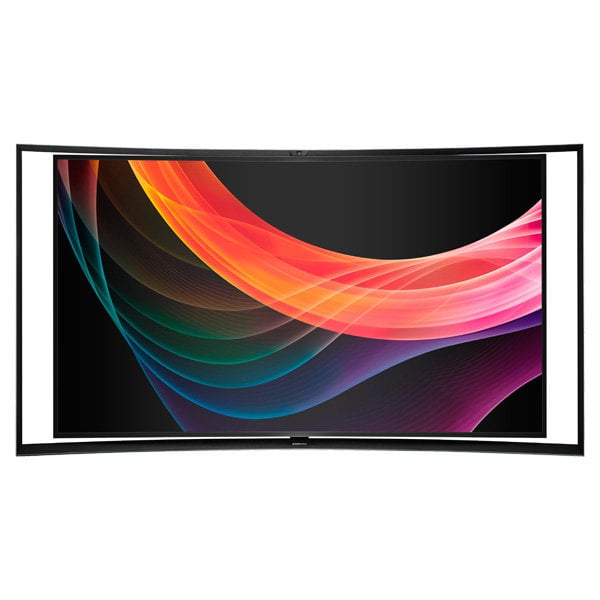
Samsung OLED
Source: Samsung.com
One of the first things you’ll want to do to narrow down your browsing is to figure out what type of TV you want. There are LCD TVs, LED TVs, OLED TVs, and plasma TVs to chose from.
Plasma: If you’re planning on getting a relatively big TV and are going to focus on high-quality cinematic viewing, a plasma TV might be for you. They tend to have excellent color quality and a high contrast ratio (we’ll get into that later), creating a beautiful image. On top of that, they often have a wide viewing angle, so it’s easier for multiple people to gather around the screen and still see a clear picture from where they’re sitting without odd color distortion or no image altogether. They aren’t the brightest TVs though, so ambient light can become a particular problem for plasmas.
LCD: Liquid Crystal Displays are pretty common to find and may be the cheapest option. They’re energy efficient and usually have good color. For simple use, they’ll probably get the job done. However, if you’re trying to do high frame-rate gaming, they might not be the best choice. On top of that, for a home theater, they tend to have very limited viewing angles, so the person sitting right at the side of the screen is going to have a really hard time watching anything.
LED: TVs branded as LED are actually just LCD TVs that use LEDs as a backlight for the liquid crystals in the display. If it has “local dimming,” it will have an advantage when it comes to contrast ratio, which is a plus. On top of that, they are less power hungry than standard LCDs and Plasma. Unfortunately, they may be more expensive.
OLED: Organic Light Emitting Diode TVs actually are different from LCD TVs. OLED TVs use colored LED lights to create the image, so they save on power, though not always as much as LED TVs. They do manage to create a high quality image, and a bright one at the — so they may be best for those planning on watching TV a lot during brighter hours when a glare could be a problem. Unfortunately, it’s a costly product to make, so it will force you to pay a bit more. They also suffer from some of the viewing angle problems that effect LCD TVs.

Contrast Ratio

I threw this term around lightly in the last section, and some manufacturers will throw this term around lightly as well. Many companies determine the contrast ratio of their TVs very differently. The contrast ratio is simple the difference in brightness between the darkest black and whitest white the TV can produce. With a low contrast ratio, black areas of an image might appear more like a washed out gray, or bright areas may lack vibrance. You’ll often see numbers like 2,000:1 or 5,000:1 to indicate the contrast ratio, and the bigger that ratio, the better — in theory.
Because manufacturers measure and report the ratios differently you might come across a TV with a 1,000,000:1 contrast ratio that still won’t create as pretty an image as a TV whose manufacturers reported as having only a 5,000:1 contrast ratio. Your best bet is to check out an external review site that tests contrast ratios. Otherwise, be sure to view the TV in a dark place, as ambient light will make it hard to tell how dark the TV’s black can get. If you know you might not have time to do all that while browsing, just pay attention to when a contrast ratio is advertised as “true” or “native” as opposed to “dynamic.” The true or native contrast ratios are more likely to give you numbers within reason that can be compared to other TVs.

Color reproduction/color depth

Source: Thinkstock
This isn’t very likely to come up, as most TV manufacturers will keep their color depth at a level that won’t frustrate consumers, but if you’re shopping for a real bargain-priced TV, you may want to make sure you get one with a bit depth of “8 bits per channel” or more, with particular emphasis on “per channel.” This will ensure the TV is able to create enough colors to satisfy the human eye and present photo-realistic images.

Aspect Ratio

This one shouldn’t take much thought. The aspect ratio is simply the ratio of the TVs width to its height. It has no particular effect on the quality of the image created by the TV. It’s most important for what you plan to view most, as you’ll want to be sure the TV’s aspect ratio is close to the aspect ratio of whatever you watch most. If you watch a lot of films, you’ll probably be looking toward wider aspect ratios, so you don’t have to leave a large portion of your screen functioning as an unspectacular letterbox. You’ll probably find a lot of 16:9, and that will probably be good enough, but if you want to watch a lot of modern, widescreen Hollywood movies, you may look around for 2.4:1.

Refresh Rate

The refresh rate of your TV is the number of times the image on the screen is refreshed per second. It’s measured in hertz, so you might see 60Hz or 120Hz listed on the box. Fortunately, you can trust this number a lot more than you could trust the contrast ratio. Higher refresh rates create a smoother flow between images and reduce motion blur — handy if you watch a lot of action movies. High refresh rates can also be good for gaming.
It’s important to keep in mind that the TVs refresh rate might not always match the refresh rate of the content going in. If you’re running and HDMI cable from your 60Hz computer to watch something from it on your 120Hz TV, the TV will have to do something to fill in the gaps. Some TVs will do what is called interpolation, which creates an image that fits between images it’s given, effectively doubling the frame rate of whatever you’re watching. Sometimes this feature is desirable, other times it creates an odd effect that makes the video too smooth and seem more like a soap opera than a feature film. Keep an eye out for features with the word “smooth,” “motion,” or “scan” in them, as that will likely indicate interpolation — fortunately, it generally can be turned off.

Input lag


Knowing that, it’s obvious that gamers should look for TVs with shorter lag. Some TVs will feature a special gaming mode that allows the input signal to skip through certain processing that would otherwise create lag.This specification is of particular importance for gamers. Input lag is the time gap between an input going into the TV and the TV creating the image. The greater the lag, the further behind what’s on the screen is from what’s actually happening in the game. Aside from just making the controls feel unresponsive in a game, a long lag can make a fast-paced game impossible.

Inputs

The TVs you look at may have more input options than you will ever know what to do with. What’s important is that you know what you will be trying to connect to your TV. If the TV has a coaxial F connector, you don’t need to worry about that if you only plan on plugging things in via HMDI and it has plenty of those.
To input a signal from a computer, modern game console, or Blu-ray players, you’ll probably want HDMI inputs. If you feel the need to connect an old VCR or DVD player, you’ll want to make sure it has analog composite inputs. For a cable box, look for a coaxial cable input. Also, if you’re planning to connect a device that uses HDCP (High-bandwidth Digital Content Protection), like many Blu-ray players, you’ll want to make sure that the TV you buy also uses HDCP.

Hold on, what’s a Smart TV?

For some, a smart TV might actually be the route to go. Smart TVs connect to the internet and can stream content that way. They often include applications like Netflix so customers require fewer devices to get started with their movie or TV watching. Some connect via Wi-Fi, while others might only have an ethernet jack. If you don’t want to deal with a lot of wires and want an uncluttered space around the TV, a smart TV might be the best option.

Well, what’s a 4K TV?

You might be seeing a lot start to pop up about 4K TVs. Just as 1080 was the buzz number when HD TVs were coming into fashion, 4K is simply the next step. A 1080p screen would have 1,080 pixels in each vertical column and 1,920 pixels in each horizontal row. The 4K defies the convention by instead counting the horizontal pixels.
What’s important to note is that the number of pixels on a screen doesn’t define the clarity of the image, but rather the density of those pixels does, along with the source resolution. If you have a 24″ 1080p TV and compare it to a 48″ 4K TV, they will have about the same pixel density. So, unless the two TVs are displaying images that are higher than a 1080p resolution, they will have the same level of clarity, but the 4K TV will show it at four times the size, which may still help you see details better. Of course, if a 4K TV and 1080p TV are the same size, the 4K TV will have notably higher image clarity for everything above 1080p resolution. Just keep in mind that a TV being 4K doesn’t mean you should ignore all the other aspects of the TV.
Understanding all of these details a little better should make it a lot easier for you to know what you’re getting when picking out a TV to complete your home theater, gaming rig, or just that empty space on your kitchen counter.